
React DevTools tells you why a component rendered. This tells you what updated with it.
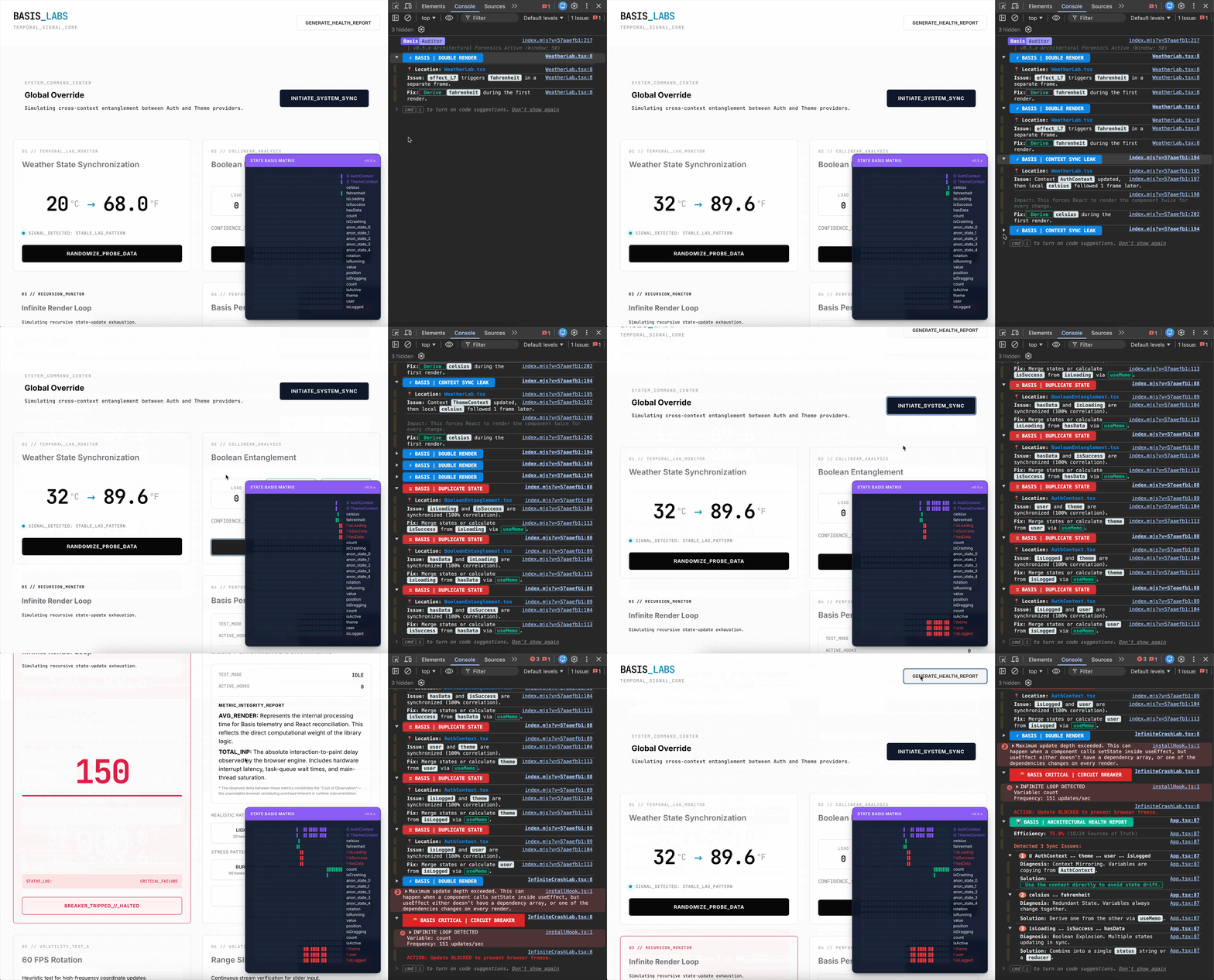
React DevTools, why-did-you-render, and React Scan answer a useful question: why did this component render?
They do not answer a different one that shows up in real apps:
What updated, what updated with it, and what looks upstream?
That is what react-state-basis is for.
It is a dev-time diagnostic. It records when state writes land - not the values - and flags repeated timing patterns: extra frames, correlated flags, context copies, and update fan-out.
Live playground: StackBlitz demo - pick a scene, open the preview console.
The problem it looks at
This is legal React and still a common source of extra paints:
const [a, setA] = useState(0);
const [b, setB] = useState(0);

useEffect(() => {
  setB(a + 1);
}, [a]);
Click the button a few times. Basis typically reports:
⚡ BASIS | DOUBLE RENDER
📍 Location: YourComponent.tsx
Issue: effect_L5 triggers b in a separate frame.
Fix: Derive b during the render phase (remove effect) or wrap in useMemo.
That “Fix:” line is a prompt from a rolling frame window, not a proof. Repeat the interaction and see whether the pattern holds.
Same idea for flags that always move together (isLoading / isSuccess / hasData), local state that only mirrors Context, or one click that fans out across several stores.
What “Basis” means
The name is a linear-algebra metaphor: a basis is a minimal set of independent vectors. Here it means “state that looks like its own source of truth,” as opposed to values you could compute during render.
The library does not prove independence. It approximates it from timing and from a short-lived update graph.
Quick start (Vite)
You keep importing from react. A build plugin attaches names so reports are not full of anonymous hooks.
npm i react-state-basis
vite.config.ts:
import { defineConfig } from 'vite';
import react from '@vitejs/plugin-react';
import { basis } from 'react-state-basis/vite';

export default defineConfig({
  plugins: [
    react({
      babel: {
        plugins: [['react-state-basis/plugin']],
      },
    }),
    basis(),
  ],
});
Wrap the app:
import { BasisProvider } from 'react-state-basis';

root.render(
  <BasisProvider debug={true} showHUD={true}>
    <App />
  </BasisProvider>
);
showHUD={false} keeps diagnostics in the console only.
Next.js (experimental)
App Router, webpack only. Turbopack does not support the SWC wasm plugin yet.
// next.config.ts
experimental: {
  swcPlugins: [['react-state-basis/swc', {}]],
}
"dev": "next dev --webpack",
"build": "next build --webpack"
The provider must be a Client Component. Without --webpack, hooks still run but stay anonymous. "use server" files are not instrumented.
Reports after you use the app
With debug={true}:
window.printBasisReport()  // ranked “start here” list
window.printBasisGraph()   // observed update graph
window.getBasisGraph()     // same graph as JSON
window.getBasisMetrics()   // engine timings
Example graph from the playground:
📊 BASIS | CAUSAL GRAPH  7 nodes · 7 edges · 2 sources · buffer window 50
parent → child = observed cause → update. (×N) = times in this window.
⚡ Event · 3 targets · ×2
    BooleanEntanglement.tsx → isLoading redundant
    BooleanEntanglement.tsx → isSuccess redundant
    BooleanEntanglement.tsx → hasData redundant
↯ WeatherLab.tsx → effect @ L7
    WeatherLab.tsx → fahrenheit (×2)
An edge is something Basis saw in this window. It is not a proof of causality. redundant means “these writes kept landing together,” not “delete this state.”
Zustand stores can sit on the same graph:
import { basisLogger } from 'react-state-basis/zustand';
What it looks for
| Pattern | What Basis saw |
|---|---|
| Effect-driven extra frame | An effect writes state after another update. If that value can be computed during render, the second paint may be unnecessary. |
| Correlated updates | Two pieces of state repeatedly move in the same window. Correlation is reported; merge is not assumed. |
| Fragmented updates | One interaction updates several components, contexts, or stores. |
| Context / store mirroring | A local hook repeatedly follows Context or a store. |
| Update origins | When several writes land together, the graph points at what looks upstream. |
Full list: Detected patterns.
Signals, not proofs
Detections use timing, correlation, update order, roles, and graph structure. Valid React can still look busy.
Intentional sync, drafts, animations, reducers, stores, and coordinated transitions can all produce hits. Use the signal with your knowledge of the app.
Ignore a whole file (must be the leading comment, nothing else on that line):
// @basis-ignore
import { useState } from 'react';
Ignore one hook call:
// @basis-ignore-next-line
const [ticks, setTicks] = useState(0);
That call is rewritten to the real React hook. Other calls in the same file stay instrumented.
How the engine actually works
Updates are sampled on requestAnimationFrame. Same tick means the same paint frame, not an arbitrary clock.
Each instrumented variable gets a fixed Uint8Array ring (~50 frames). A write in that frame is 1; no write is 0. Values are never stored.
Two views of the same trace:
Per variable - do these two timelines move together, or does one follow the other?
Across the app - those pairwise links become edges. Walking the graph asks what sits upstream.
Heavy work runs on requestIdleCallback. The hot path stays on fixed-size buffers.
Pair scoring (since 0.6.6) is not “cosine > 0.88”. Cosine is display-only. A pair hits only if the overlap is rare under a hypergeometric null and the quieter timeline lands on the other one at least ~65% of the time.
Limits worth knowing:
Timing and edges only - never values or dependency arrays
Sliding window of seconds, not the whole session
A late fetch can look like two unrelated updates
Same-frame coincidence can look related
Privacy and production
Records timing, roles, and update relationships - not state values
Production entry is a small shim; monitoring is off
The Babel/SWC plugin only rewrites the hook and context imports it needs. Everything else still comes from
react
Real-codebase demos (not “we fixed these apps”)
These show output on public code. A hit is not automatically a defect.
shadcn-admin #274 - redundant viewport state; merged
Excalidraw #10637 - theme sync pattern; not merged
If you try it
Open the live demo
Trigger Weather Lab and Boolean Entanglement
Run
printBasisReport()andprintBasisGraph()in the consoleThen wire the Vite plugin into one of your own apps and click through a real flow
Repo, wiki, and roadmap:
https://github.com/liovic/react-state-basis
If you try it on your own app, I'd genuinely like to know what it flags - especially false positives, since those are the cases that improve the heuristics.